

Disclosure: Some links in this article are affiliate links. If you buy through them, KHAMOVA may earn a commission at no extra cost to you. As an Amazon Associate, KHAMOVA earns from qualifying purchases. Read our affiliate disclosure.
Introduction: Why Every Family Needs a Clear Backup Plan
Imagine it’s 8:00 p.m. Your family is preparing dinner, the refrigerator is running, children are studying, and suddenly the electricity goes out. The Wi-Fi stops working, the lights disappear, and you start wondering which appliances should receive power first.
This situation can be stressful, especially when you don’t know how long the outage will last or how much backup electricity your household needs.
A home backup power plan helps your family decide which appliances matter most, how much electricity they consume, and how to use available backup energy wisely. You don’t need expensive equipment to start planning. First, understand your daily needs, identify essential devices, and create a realistic priority list.
This guide will help you make practical decisions without unnecessary spending or complicated technical knowledge.

Check the current price on Amazon
1. Which Household Appliances Should Your Family Prioritize?
The best starting point is to divide household appliances into essential, useful, and optional categories.
Not every appliance needs to operate during a blackout. In fact, trying to power everything at once can drain a small battery much faster than expected.
A practical family plan should begin with the equipment needed to protect food, maintain communication, provide lighting, and support essential household activities.
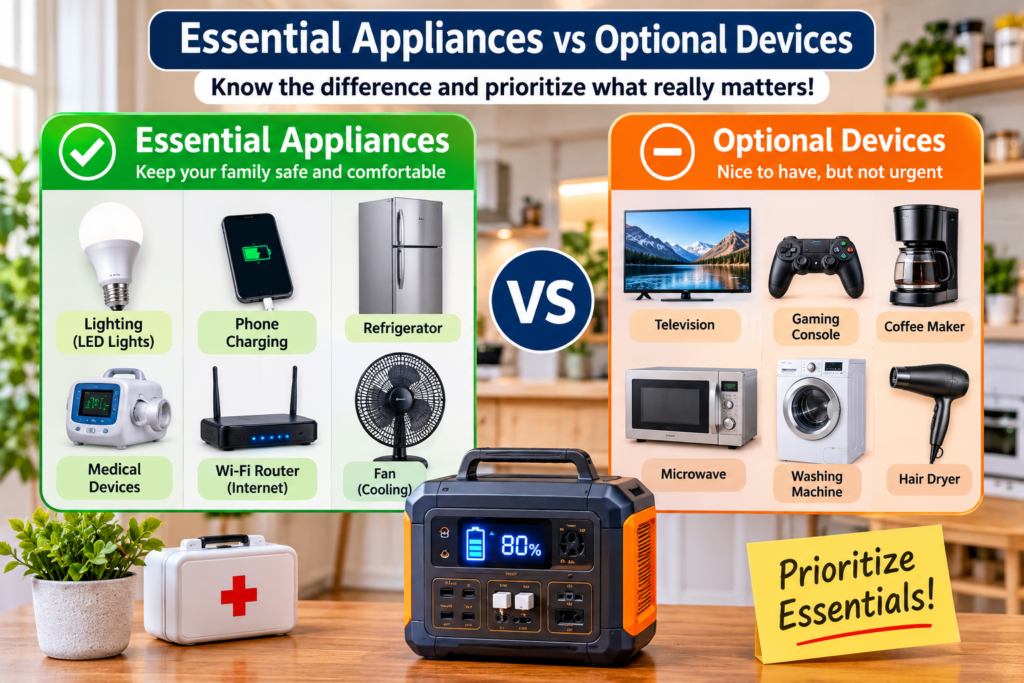
1.1 Essential appliances during a power outage
Essential appliances are devices that support basic household needs or safety.
For most families, the first priorities include:
- Refrigerator: Helps preserve food and reduce unnecessary food waste.
- Lighting: Provides visibility in kitchens, hallways, bedrooms, and bathrooms.
- Wi-Fi router: Maintains internet access when the internet service itself remains available.
- Mobile phone chargers: Keep family members connected.
- Medical equipment: Supports household members who depend on electrical medical devices.
- Small fans: Can improve comfort in warm conditions.
Medical equipment deserves special attention. If someone in your household depends on an electrically powered medical device, its power requirements should be discussed with their healthcare provider and equipment supplier before designing a backup arrangement.
1.2 Useful appliances that can improve comfort
Some appliances are not essential for immediate safety but can make an outage easier to manage.
Examples include:
- A laptop for school or work.
- A television for information and entertainment.
- A small electric kettle.
- A portable fan.
- A tablet or rechargeable radio.
You don’t necessarily need to power all these devices simultaneously.
For example, charging two phones during the evening may be more important than operating a television for several hours.
1.3 Appliances you can temporarily switch off
High-consumption appliances should usually receive lower priority when backup energy is limited.
Examples include:
- Electric ovens.
- Washing machines.
- Clothes dryers.
- Electric water heaters.
- Large air conditioners.
- Electric space heaters.
These appliances can consume substantial electricity, particularly when they produce heat or cool large spaces.
That doesn’t mean your family must avoid them in every situation. It simply means you should understand their consumption before including them in your backup plan.
1.4 A simple appliance priority comparison
The following table provides general examples. Actual electricity consumption depends on the model, operating conditions, and appliance settings.
Table caption: Household appliance priorities and typical power requirements during an outage.
| Appliance | Approximate running power | Priority |
|---|---|---|
| LED light bulb | 5–15 W | High |
| Wi-Fi router | 8–20 W | High |
| Smartphone charger | 5–20 W | High |
| Laptop | 40–100 W | Medium |
| Refrigerator | 100–250 W | High |
| Television | 50–150 W | Medium |
| Electric kettle | 1,500–2,200 W | Low |
| Washing machine | 400–1,000 W | Low |
| Electric heater | 1,000–2,000 W | Low |
These are illustrative running-power ranges, not guaranteed values. A refrigerator, for example, cycles on and off, so its average energy consumption over several hours differs from its running power while the compressor operates.
1.5 Why your family should avoid powering everything
Imagine your backup system can deliver 500 watts continuously.
If your family operates a refrigerator using 150 watts, several LED lights using 30 watts, and a router using 15 watts, the combined running load is approximately 195 watts.
However, adding a 1,500-watt kettle would exceed the available power capacity.
This is why choosing appliances carefully matters more than simply connecting as many devices as possible.
The main lesson is straightforward: prioritize essential functions rather than trying to recreate normal household electricity consumption.
Check the current price on Amazon
2. How Can You Calculate Your Family’s Backup Electricity Needs?
A useful backup plan starts with two measurements: power and energy consumption.
Power describes how much electricity an appliance needs at a particular moment. It is measured in watts (W).
Energy describes how much electricity the appliance uses over time. It is commonly measured in watt-hours (Wh) or kilowatt-hours (kWh).
Understanding the difference helps you estimate the capacity required for your household.
2.1 Step one: Find the wattage of each appliance
Start by checking the information label on your household appliances.
You may find the wattage printed on the back, bottom, or manufacturer’s specification sheet.
If the label shows volts and amps instead of watts, you can estimate power using this formula:
Watts = Volts × Amps
For example, an appliance operating at 230 volts and drawing 2 amps uses approximately:
230 × 2 = 460 watts.
This is a basic estimate. Actual power requirements can vary depending on the appliance and its operating conditions.
2.2 Step two: Estimate daily operating hours
Once you know the wattage, estimate how many hours each appliance will operate during an outage.
For example:
- Refrigerator: approximately 8 equivalent running hours.
- Router: 10 hours.
- LED lighting: 5 hours.
- Laptop: 3 hours.
For a refrigerator, equivalent running hours are only an estimation tool. Its compressor normally cycles rather than operating continuously.
2.3 Step three: Calculate watt-hours
Use this simple formula:
Daily energy consumption = Watts × Operating hours
Consider a family using a 100-watt laptop for 3 hours.
100 W × 3 hours = 300 Wh.
That means the laptop uses approximately 300 watt-hours.
Now consider a 15-watt router operating for 10 hours.
15 W × 10 hours = 150 Wh.
The combined consumption of these two devices is 450 Wh.
2.4 Step four: Build a family electricity table
Here is an example of a small household backup schedule.
| Appliance | Estimated power | Daily use | Energy |
|---|---|---|---|
| Refrigerator | 150 W | 8 hours | 1,200 Wh |
| Wi-Fi router | 15 W | 10 hours | 150 Wh |
| LED lighting | 30 W | 5 hours | 150 Wh |
| Laptop | 60 W | 3 hours | 180 Wh |
| Phone charging | 10 W | 3 hours | 30 Wh |
| Total | 1,710 Wh |
In this example, the estimated daily requirement is 1,710 Wh, equivalent to 1.71 kWh.
This number is an educational estimate. Refrigerator cycling, inverter losses, battery limits, and other factors affect the actual system capacity required.
2.5 Step five: Consider battery capacity
Battery capacity tells you how much energy a battery can store.
For example, a battery advertised as 2 kWh has a nominal storage capacity of 2,000 Wh.
However, you shouldn’t assume that every watt-hour stored inside the battery will reach your appliances.
Some energy may be unavailable because of the battery’s permitted discharge level, inverter efficiency, and operating conditions.
A simple planning estimate is:
Usable energy = Nominal battery capacity × Usable discharge percentage
For example, if a 2 kWh battery allows 90% usable discharge:
2,000 Wh × 0.90 = 1,800 Wh.
This calculation still excludes conversion losses.
For the household in the previous table, 1,800 Wh would be close to one estimated day of consumption before those additional losses are considered.
2.6 Step six: Calculate your required power capacity
Battery energy capacity isn’t the only important measurement.
You also need to know whether the inverter can supply enough power at one time.
An inverter converts electricity from a battery into the type of electricity most household appliances use.
For example, if your refrigerator, lights, and router operate together at an estimated 195 watts, your inverter must support that combined demand.
You should also account for starting power.
Some appliances, particularly refrigerators, need a temporary increase in power when their motors start. This is called surge power.
A system that supports enough running watts may still struggle if its surge capacity is too low.
This is why both measurements matter:
- Watts: How many appliances can operate simultaneously?
- Watt-hours: How long can the available energy support them?
2.7 Diagram: How energy reaches your appliances
Diagram: solar panels → solar inverter → battery storage → essential household appliances.
This is a simplified example of a solar-plus-storage arrangement. Actual system layouts vary, and some installations use different inverter and battery configurations.
2.8 Planning Tip
Planning Tip
Start by calculating the energy needs of your refrigerator, lighting, communication devices, and any essential medical equipment. Then add optional appliances only if your estimated backup capacity allows it.
3. How Should You Build an Emergency Power Plan for Your Family?
A practical emergency power plan should explain what to operate, when to operate it, and how to manage limited energy.
Once you have identified your essential appliances and calculated their estimated consumption, the next step is to organize them into a simple household routine.
3.1 Create three household electricity levels
One effective approach is to divide your appliances into three operating levels.
Level 1: Essential electricity
These devices receive the highest priority.
Examples include:
- Medical equipment.
- Refrigerator.
- Basic lighting.
- Phone charging.
- Communication equipment.
These appliances support important household needs.
Level 2: Important but flexible electricity
These devices can operate when enough backup energy is available.
Examples include:
- Laptops.
- Television.
- Additional lighting.
- Small fans.
You can reduce their operating hours when battery capacity becomes limited.
Level 3: Optional electricity
These appliances should generally be disconnected or used only when sufficient power is available.
Examples include:
- Washing machines.
- Electric ovens.
- Large heaters.
- Clothes dryers.
This three-level system helps family members understand which devices should be switched off first.
3.2 Prepare a realistic 24-hour electricity schedule
Your family doesn’t need to operate every essential appliance continuously.
Instead, create a schedule based on household routines.
For example:
| Time | Priority activity | Appliances |
|---|---|---|
| 6–9 a.m. | Morning routine | Lighting, refrigerator, phones |
| 9 a.m.–4 p.m. | Daytime activities | Refrigerator, router, laptop when needed |
| 4–8 p.m. | Family activities | Lighting, refrigerator, communication |
| 8–11 p.m. | Evening routine | Essential lighting, phones, router |
| 11 p.m.–6 a.m. | Overnight period | Refrigerator and essential medical equipment |
This is only an example. Your schedule should reflect the needs of your household.
For instance, a family working from home may need more daytime electricity, while a family with school-age children may use more energy in the evening.
3.3 Keep communication equipment ready
Phones and communication equipment are important during outages because they help families receive updates and contact other people.
Consider preparing:
- A fully charged power bank.
- Charging cables for family phones.
- A battery-powered radio.
- Important contact numbers written on paper.
- A basic flashlight for each household member.
Don’t assume that Wi-Fi will always remain available during a blackout. Your internet provider’s equipment may also lose electricity.
Mobile networks may also experience disruptions, depending on the circumstances.
3.4 Protect refrigerated food
A refrigerator is often one of the most important appliances in a household backup plan.
However, operating it efficiently is just as important as supplying it with electricity.
Follow these practical steps:
- Keep refrigerator doors closed as much as possible.
- Avoid repeatedly checking the contents.
- Organize food so you can find items quickly.
- Keep the refrigerator at its recommended temperature.
- Follow local food-safety guidance when deciding whether food remains safe after an outage.
A refrigerator may consume less energy than a large electric heater, but its importance to food storage makes it a high-priority appliance.
3.5 Include every family member in the plan
A backup plan works better when everyone understands the basic rules.
For example, children should know where the flashlights are kept and which lights they can use.
Adults should understand how to check battery status and identify appliances that need to be disconnected.
If an older family member uses medical equipment, their backup requirements should be addressed separately and professionally.
3.6 Prepare a written emergency electricity checklist
Use the following list to organize your household.
- Identify the appliances your family needs most.
- Check the wattage of each essential device.
- Estimate daily operating hours.
- Calculate approximate energy consumption in Wh.
- Identify appliances with high starting-power requirements.
- Check whether your existing solar system supports backup operation.
- Confirm the battery’s usable capacity.
- Prepare phone chargers and power banks.
- Create a household electricity schedule.
- Explain the plan to every family member.
- Keep important instructions accessible.
- Review the plan at least twice a year.
3.7 Adapt your plan to different household situations
Not every household has the same electricity requirements.
A family living in a small apartment may prioritize refrigeration, lighting, phones, and internet equipment.
A larger household may have additional requirements, including multiple refrigerators, more lighting, and several work or study devices.
Families living in warmer areas may also need to consider fans and ventilation.
For example, a household with two children studying online might need to reserve enough energy for laptops and internet equipment during the afternoon.
A household with an elderly family member may have different priorities.
The important point is to avoid copying another family’s backup plan without considering your own requirements.
3.8 Keep your plan flexible
Electricity requirements can change during the day.
A refrigerator may start its compressor while someone is using a laptop. A fan may be needed during warm weather. Several family members may need to charge their phones at the same time.
Therefore, don’t build a plan that assumes every appliance will always consume exactly the same amount of electricity.
Leave some capacity available for changes in household demand.
A good plan is one that can adapt to real household conditions without requiring complicated decisions every hour.
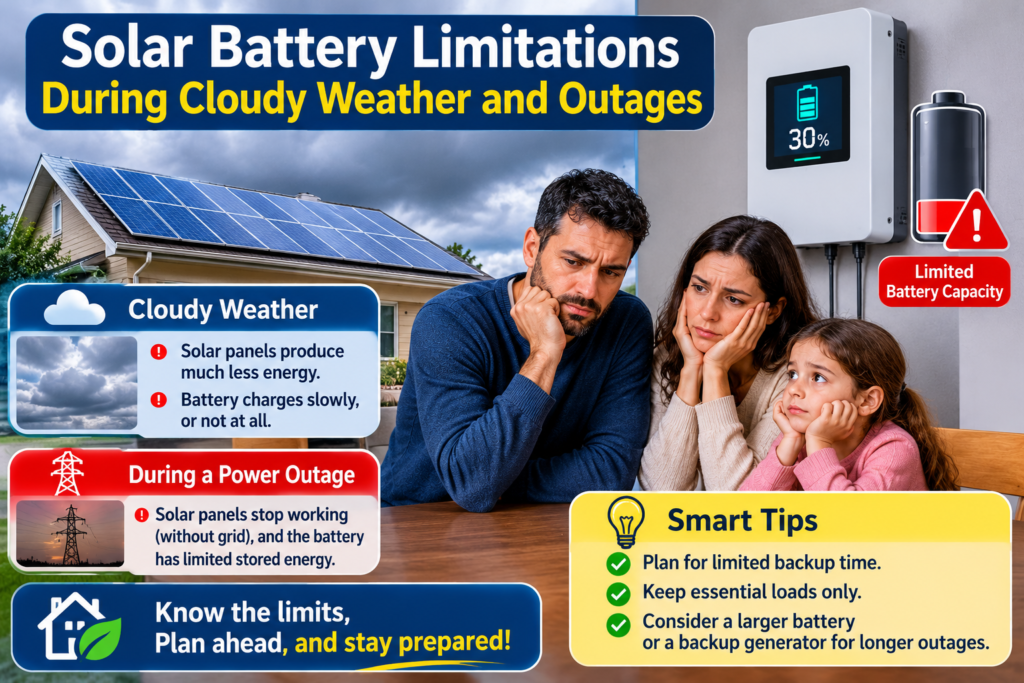
4. Realistic Limits: What This Solution Cannot Do
A backup power system can support important household appliances, but it cannot guarantee unlimited electricity during every outage.
Understanding its limitations is essential before choosing equipment or deciding how much energy your family needs.
4.1 Solar panels don’t automatically provide backup electricity
One of the most common misunderstandings is that rooftop solar panels will always operate during a grid outage.
In reality, many conventional grid-connected solar systems automatically shut down when the electricity grid fails.
This safety feature helps prevent electricity from being sent into power lines while utility workers may be repairing them.
To provide backup electricity, a solar installation needs appropriate backup equipment and a properly configured system.
According to the U.S. Department of Energy, solar panels combined with suitable storage and inverter technology can support household electricity during certain grid disruptions.
The exact capability depends on the installation.
4.2 A battery has limited stored energy
A battery cannot supply unlimited electricity.
Consider a household with a battery that has 2 kWh of nominal capacity.
If the household consumes 500 Wh per hour on average, that battery cannot support the household indefinitely.
Even under simplified assumptions, its theoretical operating time would be:
2,000 Wh ÷ 500 W = 4 hours.
Actual operating time may be shorter because of discharge limits, inverter losses, and other factors.
This example demonstrates why battery capacity should be compared with expected household consumption.
4.3 Cloudy weather can reduce solar production
Solar panels generate electricity from sunlight.
During cloudy weather, they may still produce electricity, but their output can be lower than under strong sunlight.
If your battery is already low and solar production decreases, your available backup energy may become more limited.
For this reason, families should avoid assuming that solar panels will fully recharge their batteries every day.
A realistic plan should consider several possible weather conditions.
4.4 Grid-connected systems without batteries may not power your home
A conventional grid-connected solar system without backup storage generally cannot supply household electricity when the grid is unavailable.
Even when the sun is shining, the system may shut down because its inverter is designed to disconnect from the grid.
Some specialized systems provide limited daytime backup without a battery, but this requires compatible equipment and specific installation arrangements.
Never assume that your existing panels can provide backup electricity without checking the system documentation.
4.5 High-power appliances can drain batteries quickly
Some household appliances consume much more electricity than others.
For example:
- A 15-watt router uses approximately 15 Wh in one hour.
- A 100-watt laptop uses approximately 100 Wh in one hour.
- A 1,500-watt heater uses approximately 1,500 Wh in one hour.
A heater can therefore consume as much energy in one hour as a small router would use in 100 hours, assuming both operate continuously at those power levels.
This comparison shows why appliance selection is important.
4.6 Battery capacity and inverter capacity are different
A battery may store enough energy for several hours but still be unable to power multiple appliances simultaneously.
For example, a system might contain a large battery but have an inverter that cannot support the combined power requirements of a refrigerator, kettle, and heater.
This is why you should check both:
- Battery capacity, measured in Wh or kWh.
- Inverter output capacity, measured in W or kW.
Surge capacity is another important specification for appliances with motors.
4.7 Safety should always come first
Backup electricity must be installed and operated correctly.
Avoid connecting generators directly to household wiring without approved transfer equipment.
Never operate fuel-powered generators indoors, in garages, or near open windows because carbon monoxide can cause serious poisoning.
Do not modify electrical wiring or connect batteries without suitable protection and professional guidance.
For permanently installed backup equipment, use a qualified electrician or appropriately licensed installer who understands local electrical requirements.
4.8 Understand the limits before spending money
A family doesn’t necessarily need a large solar installation.
Some households may only need a small portable power station for phones, lighting, and communication devices.
Others may require a professionally designed solar-plus-battery system to support refrigeration and additional essential appliances.
The correct solution depends on the required power, operating hours, budget, existing equipment, and local installation conditions.
The most important step is to calculate your needs before choosing a product.
Check the current price on Amazon
5. How Can Families Choose a Backup Strategy Without Wasting Money?
The best backup strategy is the one that matches your household’s actual electricity requirements and financial situation.
You don’t have to purchase an entire solar system immediately. You can begin with information about your current appliances and build a plan gradually.
5.1 Start with equipment you already own
Before purchasing anything, inspect your household equipment.
You may already have:
- Rechargeable flashlights.
- Power banks.
- Battery-powered radios.
- Efficient LED bulbs.
- A compatible portable power station.
These items can help with basic household preparedness.
However, check the manufacturer’s instructions and safety requirements before using any battery-powered equipment.
5.2 Compare different backup options
Different backup solutions provide different levels of support.
| Backup option | Best suited for | Main limitation |
|---|---|---|
| Power bank | Phones and small devices | Limited energy capacity |
| Portable power station | Phones, lights, laptops, selected appliances | Limited battery and inverter capacity |
| Solar panels with battery | Selected household appliances | Weather and system capacity |
| Standby generator | Larger backup loads | Fuel, maintenance, and ventilation requirements |
| Grid-connected solar without backup | Reducing normal electricity use | Usually shuts down during grid outages |
There is no single solution that works best for every household.
5.3 Consider your household budget
Budget planning should begin with priorities rather than product advertisements.
Write down the appliances you need to support and calculate their expected energy consumption.
Then compare different solutions based on their actual specifications.
If you research prices, remember that costs vary by location, system size, equipment quality, installation requirements, and local regulations.
A lower purchase price doesn’t necessarily mean a better long-term solution.
5.4 Think about maintenance and future needs
Backup equipment requires attention over time.
Batteries may lose capacity as they age. Generators need maintenance. Solar panels and electrical connections should be inspected according to manufacturer recommendations.
Your family’s electricity needs may also change.
For example, adding a home office or another refrigerator may increase the amount of backup power you need.
Review your calculations whenever household requirements change.
5.5 Make a simple decision before purchasing
Ask yourself these five questions:
- Which appliances must operate during an outage?
- How many watts do they require together?
- How many watt-hours will they consume?
- How long should the backup system operate?
- Does the proposed equipment support the required running and surge power?
If you cannot answer these questions yet, continue gathering information rather than rushing into a purchase.
5.6 Learn how solar components work together
A solar backup system is made up of several components.
Solar panels generate electricity from sunlight. The inverter converts electricity into a usable form. A battery stores energy for later use, and backup controls manage the supply during a grid interruption.
Diagram: solar panels → charge control or compatible inverter → battery → backup circuits → essential household appliances.
The actual design depends on the equipment selected.
For a beginner, understanding these basic functions makes it easier to compare systems and ask installers useful questions.
5.7 Keep learning before making a final decision
If you want to understand the technical side more clearly, continue with the other articles in this family solar education series.
Related article: How Many Watts Do Home Appliances Use? A Family Wattage Chart (Fridge, Router, Lights and More) (helps you estimate appliance power requirements).
Related article: What Is a Solar Inverter? Running Watts vs Surge Watts Explained (explains the difference between normal operating power and temporary starting power).
Suggested source: U.S. Department of Energy — Solar and Resilience Basics (reason: neutral reference for understanding how solar panels, batteries, and inverters support backup electricity).
Suggested source: National Renewable Energy Laboratory — Will Solar Panels Help When the Power Goes Out? (reason: neutral technical reference for understanding the limitations of solar systems during grid outages).

6. Frequently Asked Questions About Family Backup Power
Q1. Which appliances should I power first during a blackout?
Start with essential equipment such as medical devices, refrigeration, basic lighting, phones, and communication equipment. Your exact priorities depend on your household’s needs. If someone relies on powered medical equipment, make sure their backup arrangements are planned with a qualified healthcare or equipment professional.
Q2. How many watts does a family need for backup electricity?
There is no universal number. A small household supporting a refrigerator, router, LED lights, and phone chargers may need a few hundred watts of running capacity, but starting power and additional appliances can increase the requirement. Calculate the combined running watts and check surge requirements before selecting equipment.
Q3. Can solar panels power my home during a blackout?
Not necessarily. Many standard grid-connected solar installations automatically shut down when the grid fails. To provide backup electricity, a system generally needs a suitable inverter, appropriate backup controls, and often battery storage. Check your installation specifications rather than assuming your panels will work independently.
Q4. How long can a home backup battery last?
Battery operating time depends on usable capacity and the electricity consumed by connected appliances. A 2 kWh battery supplying a continuous 200-watt load would provide approximately 10 hours under ideal mathematical assumptions. Real operating time is usually lower because of conversion losses and battery operating limits.
Q5. Is a portable power station enough for a family?
It can be enough for certain basic needs, such as charging phones, powering LED lights, and operating selected small devices. However, a portable power station may not support large appliances or long outages. Check its usable energy capacity, continuous output, surge rating, and compatibility with your appliances.
Q6. Should I turn off my refrigerator during an outage?
Generally, keeping the refrigerator closed is important for preserving food temperatures. If it is connected to a suitable backup system, include its energy requirements in your calculations. Follow recognized food-safety guidance when deciding whether refrigerated or frozen food is safe after an extended outage.
Q7. Can I operate a heater and refrigerator at the same time?
It depends on the inverter’s continuous power capacity, surge capacity, and the battery’s ability to supply energy. A typical electric heater can consume 1,000–2,000 watts, which may use a large portion of a small backup system’s capacity. Check the appliance labels and system specifications first.
Q8. How often should I update my family backup plan?
Review your plan at least twice a year and whenever you purchase a major appliance or change your household’s electricity requirements. Check battery condition, equipment instructions, and emergency contact information. A regular review helps keep your calculations realistic and your household prepared.
Conclusion: Build a Backup Plan Around What Matters Most
A reliable family backup strategy begins with understanding which appliances matter most, how much electricity they consume, and how long your household needs them to operate. You don’t have to power every device during an outage to maintain important household functions.
A practical home backup power plan should prioritize safety, refrigeration, communication, lighting, and essential medical needs while respecting the limits of your available energy.
Continue learning with How Many Watts Do Home Appliances Use? A Family Wattage Chart (Fridge, Router, Lights and More) and What Is a Solar Inverter? Running Watts vs Surge Watts Explained.
Take time to calculate your family’s needs, review your options, and make informed decisions at your own pace.
Keep Learning About Solar Energy for Your Family
Building a reliable home backup power plan starts with understanding your household’s electricity needs. If you want to learn more about appliance power consumption, read our previous guide: [How Many Watts Do Home Appliances Use? A Family Wattage Chart (Fridge, Router, Lights and More].
For more practical tips, beginner-friendly solar guides, and family energy-saving advice, visit Khamova and continue exploring smarter ways to prepare your home for the future.